Knowledge Base (Ticketing System)
1. Masuk ke https://member.idpsolution.com/authentication/login masukkan username dan password yang sebelumnya sudah dikirimkan melalui email1. Go to https://member.idpsolution.com/authentication/login enter the username and password that previously sent by email
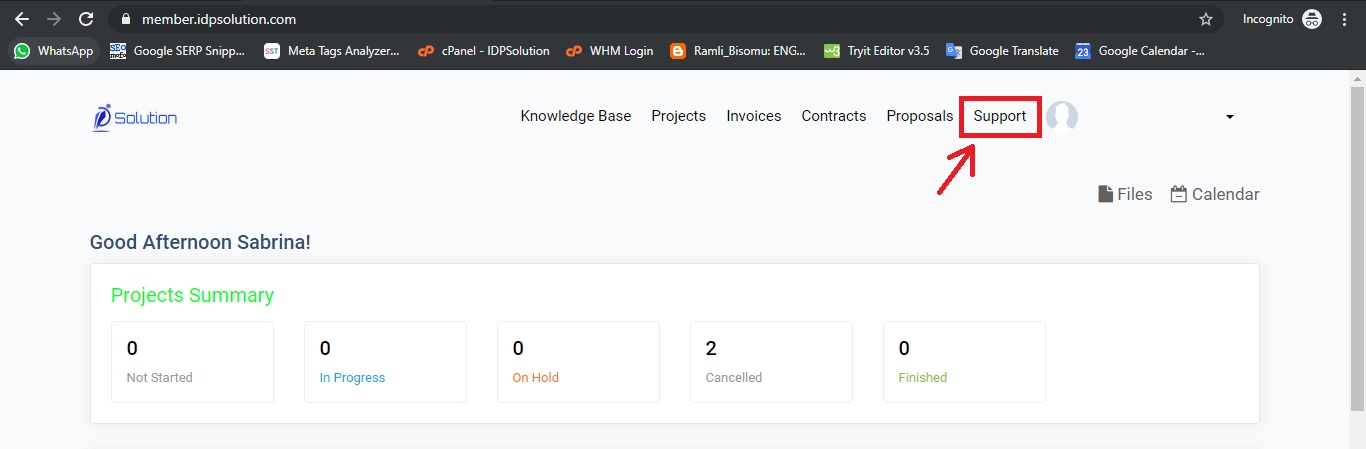
2. Setelah masuk ke Dashboard, Klik Support untuk melihat status Ticket-Ticket yang telah dibuat
2. After entering the Dashboard, click Support to see the status of the Tickets that have been made
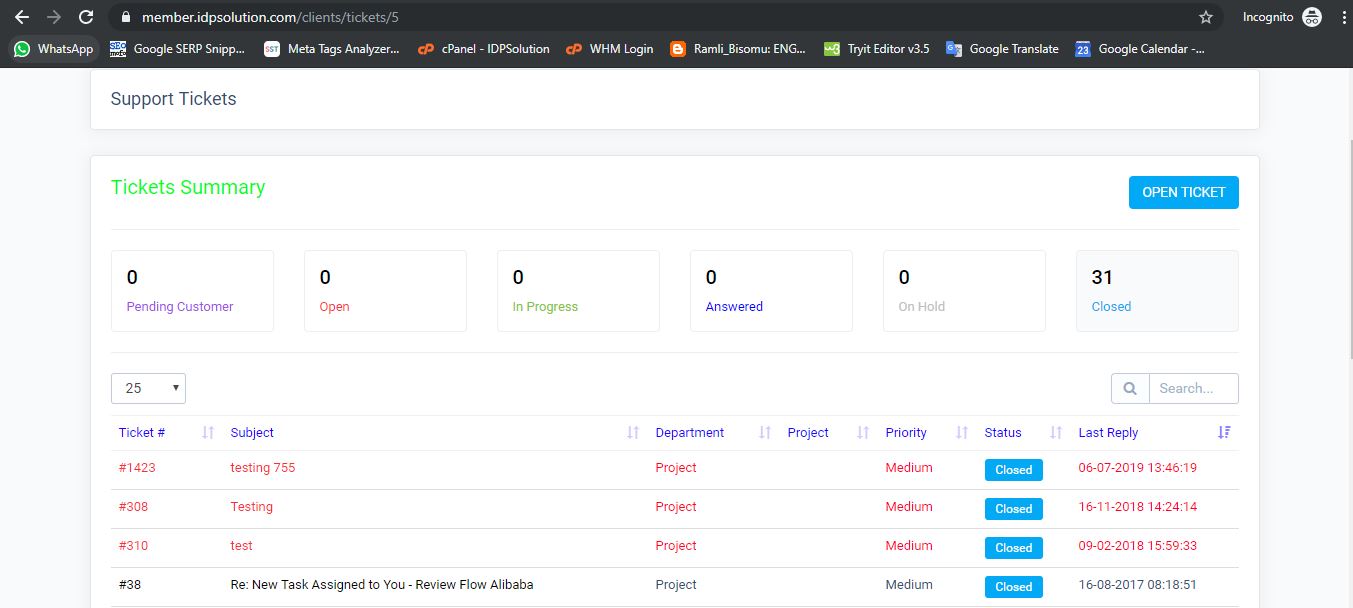
3. Akan tampil daftar Ticket dan status masing-masing Ticket tersebut. Masing-masing status mempunyai arti yang berbeda-beda, lihat tabel di bawah untuk melihat penjelasan arti masing-masing status tersebut.
3. The ticket list and the status of each Ticket will appear. Each status has a different meaning, see table below to see an explanation of the meaning of each status.
|
|
Indonesia |
English |
|
Pending Customer |
Status ini menunjukkan bahwa IDPSolution mengajukan pertanyaan kepada klien atau melaporkan progress pengerjaan dan membutuhkan konfirmasi dari klien secepatnya sebelum pengerjaan dilanjutkan kembali. Jika tidak ada jawaban dari klien selama 7 hari berturut-turut, maka Status Ticket akan otomatis berubah menjadi Closed
|
This status shows that IDPSolution asked the client questions or report the progress of work and needed confirmation ASAP before proceeding again. If there is no reply from the client for 7 consecutive days, the Ticket Status will automatically change to Closed |
|
Open |
Status ini menunjukkan bahwa klien mengirim request pengerjaan dan belum diproses, maka pihak IDPSolution harus secepatnya merespon Ticket agar status Ticket berubah menjadi In Progress atau Pending Customer (jika dibutuhkan konfirmasi ulang dengan klien) |
This status shows that the client sent a work request and has not yet been processed, IDPSolution should respond to the Tickets ASAP so that the Ticket status changes to In Progress or Pending Customer (if reconfirmation is required with the client) |
|
In Progress |
Status ini menunjukkan bahwa request pengerjaan yang klien kirimkan sedang dalam tahap pengerjaan oleh Tim Produksi |
This status shows that the work request that the client sent is in the working stage by the Production Team |
|
Answered |
Status ini menunjukkan bahwa pengerjaan sudah diselesaikan oleh pihak IDPSolution. Jika tidak ada feedback lanjutan dari klien selama 7 hari berturut-turut, maka Status Ticket akan otomatis berubah menjadi Closed |
This status shows that the work has been completed by IDPSolution. If there is no further feedback from the client for 7 consecutive days, the Ticket Status will automatically change to Closed |
|
On Hold |
Status ini menunjukkan bahwa pengerjaan ditunda karena hal-hal tertentu |
This status shows that the work will be held because of certain things |
|
Closed |
Status ini berisi: 2. Ticket yang isinya sama dengan Ticket lain sehingga ditutup agar tidak terjadi kebingungan untuk melaporkan progress pekerjaan. 3. Ticket yang tidak mendapatkan respon balasan lebih dari 7 x 24 jam |
This status contains: 1. All issues regarding Ticket have been resolved and there is no further work. 2. Ticket with the same contents as other Ticket so it is closed so there is no confusion to report on the progress of the work. 3. Tickets that do not get a response back more than 7 x 24 hours |
4. Untuk membuat Ticket baru, klik tombol Open Ticket. Isi Subject dan Body Message lalu tekan tombol Save
4. To create a new Ticket, click the Open Ticket button. Fill in Subject and Body Message then press the Save button
NOTE: Jika ingin mengirimkan banyak materi, mohon agar letakkan materi tersebut ke dalam Folder dengan penjelasan dan dijadikan satu menjadi file.rar atau share melalui link Google Drive atau We Transfer. Hindari mengirim Ticket berulang-ulang dengan isi yang sama atau membuat ticket dengan sistem satu ticket satu materi.
NOTE: If you want to send a lot of material, please put the material into a folder with an explanation and put it into a .rar or share file via the Google Drive or We Transfer link. Avoid sending Tickets repeatedly with the same contents or making a ticket with a one ticket one material system.